AudioTool
jjbunnMusic & Audio
4.6353.00 Reviews
- Version
- 8.6.5
- Installs
- 50.00K
- Age Rating
- Everyone
Screenshots
Our Review of AudioTool
 Analysis by Appyee
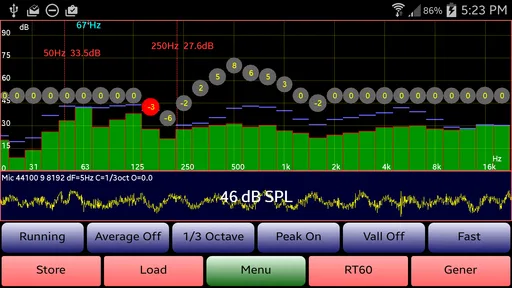
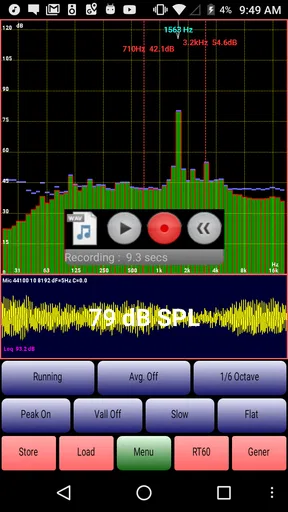
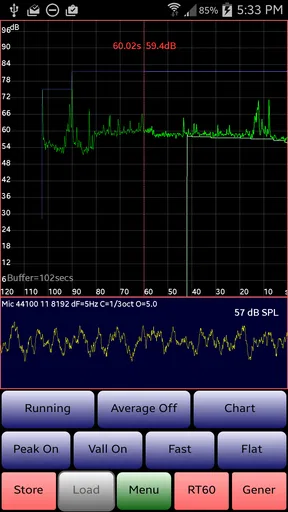
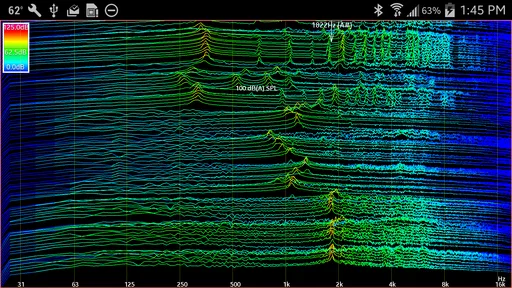
I reach for AudioTool when I want a quick, practical way to check sound levels rather than turn my phone into a music studio. It is a paid Android audio utility by jjbunn, built around sound-pressure, decibel and sone readings, with a spectrum analyzer for looking at how sound is distributed across frequencies. That focus makes it more useful for checking a noisy room, a speaker setup or a rehearsal than for composing music. My main reservation is that a phone-based reading is best treated as a helpful reference, not a substitute for calibrated measurement equipment.
What the readings are useful for
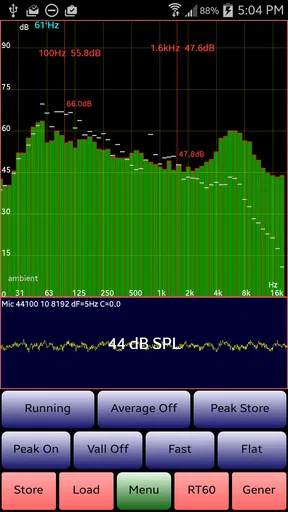
The different views answer related but distinct questions. A decibel reading gives me a way to compare loudness, while a sone view can make perceived loudness easier to think about. The spectrum analyzer adds another angle: instead of only asking how loud something is overall, I can look for where the sound energy is concentrated. Those views are most helpful together, when I am trying to understand a sound rather than simply collect a number.
For example, if a fan or appliance seems irritating, the meter can help me compare its sound in two locations or before and after moving it. The spectrum view may help show whether the sound is dominated by a particular band. I would not use that alone to diagnose a machine, but it can make a practical listening check less vague.
Checking sound in everyday situations
A realistic use is checking a small room before a video call or recording. I can take a quick reading near the desk, then repeat it by a window or doorway and compare the results. That will not tell me exactly how a microphone will capture my voice, but it can reveal whether the room is noisier in one spot. The spectrum display can also help me notice persistent low-frequency hum that I might otherwise overlook.
It is similarly handy when setting up portable speakers. I can keep the phone in the same place while adjusting volume, then compare readings instead of relying entirely on memory. I would avoid placing the phone directly beside a speaker: distance and position affect what the microphone picks up, and a close reading is not a meaningful stand-in for what people across the room hear.
How it compares with simpler meter apps
A basic sound-level app is often enough if all I need is a quick indication that a space has become louder. AudioTool makes more sense when I also want the spectrum and the additional loudness-oriented views in one tool. That extra information is useful for curious listeners, musicians checking a practice space, and people troubleshooting sound around the home. It is less compelling if I only want a one-tap number and have no interest in interpreting anything beyond it.
Compared with dedicated sound-measurement hardware, a phone app is easier to carry and use casually, but the phone’s microphone and handling affect the result. I would use AudioTool to compare conditions, spot changes and guide a first investigation. For compliance, occupational safety decisions or other situations where accuracy has real consequences, I would choose appropriate calibrated equipment and follow the relevant measurement procedure instead.
Network moments and mobile use
The core appeal is having sound-analysis tools on a device I can take from room to room. In an everyday check, I can open the meter where the noise is happening rather than remember to bring a separate gadget. That is particularly convenient for comparing a quiet corner with a busy area, or checking how a room changes when a door is closed.
Sharing or discussing a result is a different kind of task from taking a reading. If I want someone else to assess what I found, I need to communicate the context as well as the number: where the phone was, what was making the sound, and whether anything changed between checks. A single reading stripped of that context can be misleading. I would not assume that an online connection makes a measurement more accurate; the microphone, phone position and environment matter more to the reading itself.
For mobile use, a simple repeatable routine helps. I hold the phone in the same orientation, keep it at roughly the same distance from the source, and pause before comparing readings. I also avoid touching or moving the device during a check, since handling noise can muddy what I am trying to observe. These habits matter more than chasing tiny differences between two casual readings.
When a reading looks wrong
If a result seems surprising, I first repeat the check from the same position and listen for a sound that may have changed. Then I move a short distance and compare again. If the readings vary a lot, that can be a clue that the source is intermittent, the room has reflections, or my phone placement is inconsistent—not necessarily that the app has failed.
This is one reason I would not make a decision from a single moment on the meter. For a household noise complaint, for instance, I would check at several times and note whether a fan, traffic or conversation was present. For a speaker adjustment, I would make one change at a time. That approach makes the comparison more useful and avoids treating a phone’s reading as an unquestionable verdict.
Data-conscious habits and practical limits
AudioTool is best approached as a measurement and analysis tool, not as a reason to record every sound around me. I can use it for a brief check, take note of the conditions, and close it when I am done. When sharing a result, I would send only the information needed to explain the comparison rather than include unnecessary details about where or when I made it.
Its main limitation is inherent to phone-based sound measurement: devices differ, and microphones are not all equivalent. Cases, accessories, orientation and distance can also change what the microphone receives. I would therefore trust broad comparisons made consistently more than a tiny difference between readings. If the question is whether a space is safe, whether a workplace meets a formal limit, or whether a product complies with a standard, this app should not be my only instrument.
Who will get the most from it
I think the app suits musicians checking rehearsal volume, home users investigating a persistent noise, and audio hobbyists who want to explore frequency content without carrying extra equipment. It is also useful for someone who wants more than a bare loudness number and is willing to learn what the different displays can and cannot tell them.
I would skip it if I only need an occasional, uncomplicated indication of whether a room is quiet or loud. I would also look elsewhere if my work depends on documented, calibrated measurements. In those cases, a simpler meter may be quicker for casual checks, while dedicated measurement gear is the better choice for decisions that require dependable accuracy.
Price, support and fit
AudioTool costs $7.99, so I would think of it as a purchase for a recurring need rather than a novelty to open once. It has a 4.6 average from around 1.7 thousand ratings, and its age rating is Everyone. The app has been around since October 24, 2010, and its current version is 8.6.5; it requires Android 5.0 or later. With over 50 thousand installs, it has found an audience among people looking for a more capable mobile sound tool.
Those details do not change the practical question: will I use the spectrum and multiple sound views often enough to justify the price? If I regularly compare noisy environments or experiment with audio, the extra context can be worth having close at hand. If I only want a quick loudness check once in a while, a simpler alternative may be better value.
Overall, I see AudioTool as a useful pocket companion for exploring sound and making consistent informal comparisons. Its strongest point is the combination of several ways to inspect a sound, rather than a single number. Its weakest point is the temptation to treat a phone reading as laboratory-grade truth. Used with sensible positioning and realistic expectations, it can help me understand what is happening in a room; for high-stakes measurement, I would reach for calibrated equipment instead.
Getting Started with AudioTool
The first thing you'll notice when you open AudioTool is its sleek and intuitive interface. It’s designed to give you a quick start into music production without overwhelming you with too many options. You can easily navigate through its features, which is a big win in my book because let's face it, nobody wants to feel like they’re learning rocket science just to make some beats.
Upon launching the app, you're greeted with a variety of options. Whether you want to dive into a pre-existing template or start from scratch, AudioTool has got you covered. The app provides a comprehensive tutorial that helps you get acquainted with its powerful features. I found this particularly helpful as it guided me through the basics and ensured I didn’t miss out on any hidden gems within the app.
Features That Make AudioTool Stand Out
One of the standout features of AudioTool is its extensive library of virtual instruments and effects. From synthesizers to drum machines, the app offers a range of options that cater to different genres of music. You can tweak and customize these instruments to your heart's content, giving you the creative freedom to craft unique sounds.
The app also supports multi-track recording, which is essential for layering different sounds and creating complex compositions. I was particularly impressed with the mixing console, which allows you to adjust levels, add effects, and fine-tune your tracks to perfection. The level of control you get over your music is nothing short of amazing.
Another feature worth mentioning is the community aspect of AudioTool. You can easily share your creations with other users, get feedback, and even collaborate on projects. This social element not only enhances the creative process but also provides inspiration from fellow music creators around the world.
Performance and Usability
Now, you might be wondering about performance. After all, an app can have all the bells and whistles, but if it lags or crashes, what's the point? I’ve used AudioTool on both Android and iOS devices, and I can confidently say that it performs exceptionally well. The app is stable, and the response time is impressive, even when handling multiple tracks and effects.
In terms of usability, AudioTool shines with its user-friendly design. The drag-and-drop functionality makes it easy to arrange clips and sounds. Plus, the ability to pinch and zoom in on the timeline is a neat feature that makes editing a breeze. It's clear that the developers have put a lot of thought into making this app accessible for both beginners and seasoned producers.
Why AudioTool is a Must-Have for Music Creators
If you're serious about music production, AudioTool is a must-have app in your arsenal. It combines robust features with an easy-to-use interface, making it perfect for creating high-quality music on the go. Whether you're composing a cinematic score or laying down beats for your next track, AudioTool has the tools you need to bring your musical ideas to life.
In conclusion, AudioTool is more than just an app; it's a gateway to endless musical possibilities. Its combination of powerful features, ease of use, and community engagement makes it a standout choice for anyone looking to produce music on a mobile device. So, if you haven’t already, give AudioTool a try and unleash your inner music producer!
Verdict
Strengths of AudioTool
- Intuitive interface for easy music creation.
- Wide range of virtual instruments available.
- Supports collaboration with other users.
- Cloud saving for access from any device.
- Regular updates with new features.
Limitations of AudioTool
- Requires stable internet for optimal use.
- Can be resource-intensive on older devices.
- Limited offline capabilities.
- Steeper learning curve for beginners.
- Some features locked behind paywall.
Similar Picks in This Category
View All
YouTube Music
Google LLC4.4

Samsung Music
Samsung Electronics Co., Ltd.3.8

Spotify: Music and Podcasts
Spotify AB4.3

JioSaavn - Music & Podcasts
Saavn Media Limited4.3

Lark Player:Music Player & MP3
Lark Player Studio - Music, MP3 & Video Player4.6

StarMaker: Sing Karaoke Songs
SKYWORK AI PTE. LTD.4.3
Frequently Asked Questions
What is AudioTool and what can I use it for?
AudioTool is a comprehensive music production app available on both Android and iOS. It allows users to create music using various synthesizers, samplers, and effects. Whether you're a beginner or a professional, AudioTool provides a platform to compose, edit, and export tracks with ease.
Is AudioTool suitable for beginners in music production?
Yes, AudioTool is designed to be user-friendly for beginners while offering advanced features for more experienced users. It includes tutorials and a supportive community to help new users get started. The intuitive interface makes it easy to explore music creation even if you have no prior experience.
What features does AudioTool offer for music creation?
AudioTool offers a wide range of features, including synthesizers, drum machines, a modular effects rack, and a powerful sequencer. It also supports MIDI input, allowing for external controllers. Users can collaborate in real-time and access a vast library of samples and presets to enhance their projects.
Are there any in-app purchases or subscriptions required for AudioTool?
AudioTool is free to download and use, with basic features available at no charge. However, there may be in-app purchases or subscription options for additional features, premium samples, or enhanced tools. Users can choose to upgrade based on their specific needs and preferences.
Can I share my music created in AudioTool with others?
Absolutely! AudioTool allows users to export their tracks in various formats for sharing. You can also publish your creations directly to the AudioTool community or other platforms like SoundCloud. This makes it easy to showcase your work and receive feedback from other music enthusiasts.
